← Integrations
Chart Overlay Integration

TRADINGVIEW.

PriceMap levels, drawn straight onto your TradingView charts through the Cloud Levels indicator.

Setup

TradingView doesn't take a desktop install the way a native platform does. Instead, PriceMap levels are drawn by a free community indicator — Cloud Levels — that imports externally-prepared price levels onto your chart. Add the indicator once, point it at your symbol, and paste in your PriceMap levels.
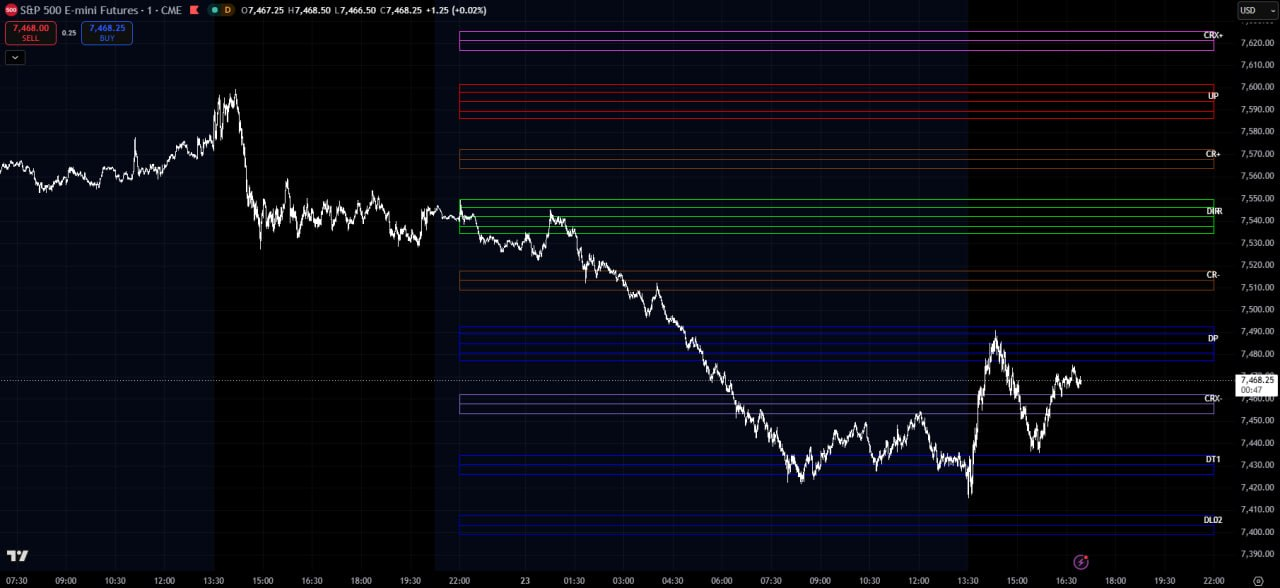
PriceMap levels overlaid on a TradingView chart via the Cloud Levels indicator
PriceMap levels on a TradingView chart via the Cloud Levels indicator.
  1. Have an active subscription

    Any MKT.TRADE package works, including the two-week trial.

  2. Add the Cloud Levels indicator

    Open the Cloud Levels [Import Price Levels] script on TradingView and add it to your chart. It's free to use.

  3. Match your symbol

    Set the indicator to the same instrument you're charting, so the levels line up with the right market.

  4. Paste in your PriceMap levels

    Copy your PriceMap levels from your MKT.TRADE account and paste the formatted level data into the indicator's inputs. The indicator parses it and draws your PriceMap levels, zones, and labels directly on the chart.

  5. Trade the structure

    Your PriceMap levels appear on TradingView, refreshed each session in step with the analytics on the site.

The Platform

TradingView® is a web-based charting platform and trader social network covering stocks, futures, and forex, used by tens of millions of traders worldwide. Its charts run in any browser, so your PriceMap levels travel with you across desktop and mobile. Visit TradingView to create a free account.

The overlay itself is drawn by chipmonk's Cloud Levels indicator — a free, closed-source community script for importing external price levels. PriceMap supplies the levels; the indicator draws them.

Risk Disclosure

Trading contains substantial risk and is not for every investor. An investor could potentially lose all or more than the initial investment. Risk capital is money that can be lost without jeopardizing one's financial security or lifestyle. Only risk capital should be used for trading and only those with sufficient risk capital should consider trading. Past performance is not necessarily indicative of future results.

TradingView® is a registered trademark of TradingView, Inc. The Cloud Levels [Import Price Levels] indicator is the work of its author, chipmonk, and is used under TradingView's terms. No affiliation, endorsement, or sponsorship by TradingView or the indicator's author is stated or implied.

OVERLAY PRICEMAP.

Subscribe, add the Cloud Levels indicator, and bring PriceMap onto your TradingView charts. Every package starts with a two-week trial.